GraphQL Introduction: A Comprehensive Guide to Queries, Mutations, and Subscriptions (2025)
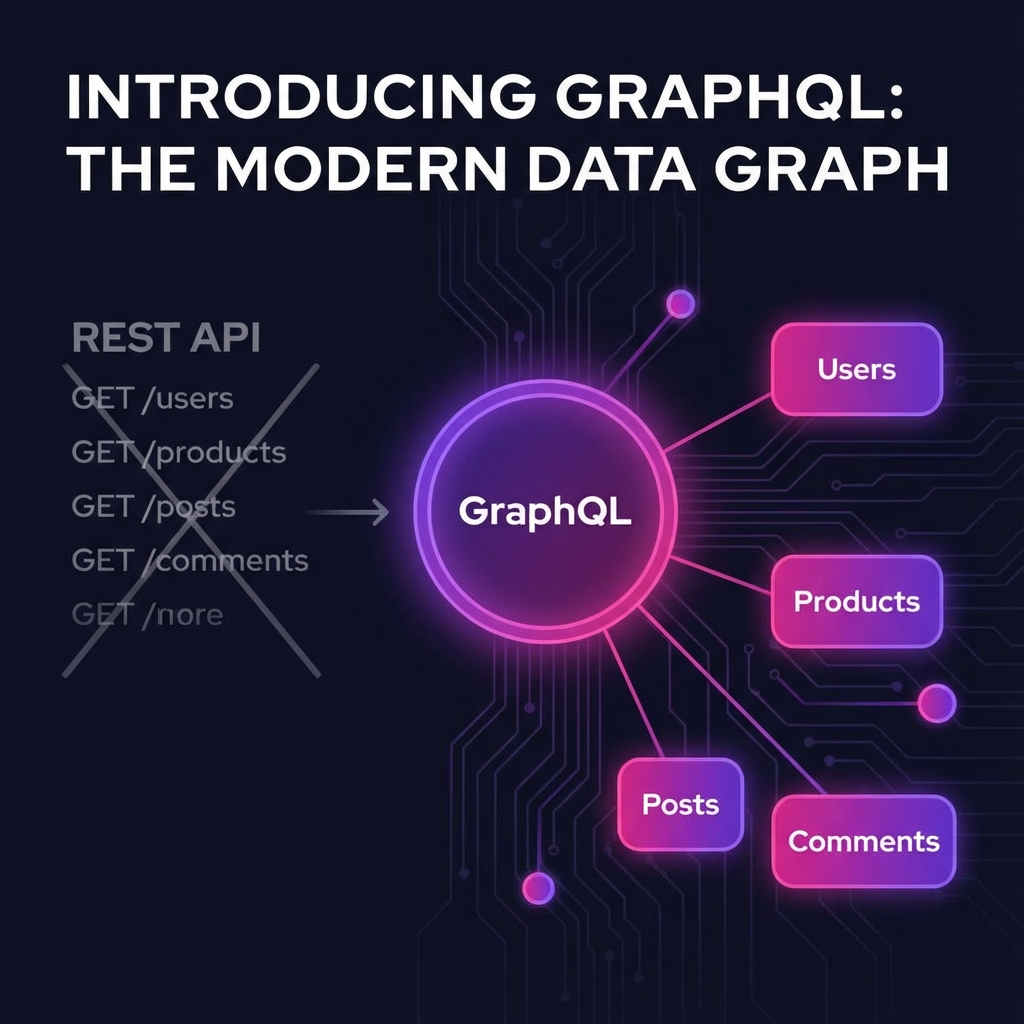
In the beginning, there was REST. It was standard, cacheable, and adequate for the web of the 2000s. But as mobile applications and rich single-page applications (SPAs) evolved, the limitations of REST became painful.
Consider a typical profile page scenario:
- Fetch the User's Name (
GET /users/1). - Fetch their last 5 posts (
GET /users/1/posts). - Fetch the comments for those posts (
GET /posts/X/comments).
You just made 7 HTTP requests to render one screen. This is Underfetching.
Alternatively, you might call GET /users/1?include=everything and download a 5MB JSON blob when you only needed a first name. This is Overfetching.
Enter GraphQL.
In 2012, Facebook engineered a solution: "Ask for exactly what you need, and get nothing else." This declarative data-fetching language is defined by three core operations:
- Query: Reading data.
- Mutation: Changing data.
- Subscription: Watching data in real-time.
In this guide, we will master all three.
Part 1: The Query (Reading)
A Query is a description of the shape of the data you want. It looks like JSON without values.
The Basic Request
query {
  user(id: "123") {
    name
    email
    posts(limit: 5) {
      title
      likes
    }
  }
}
The Response
The server returns JSON matching exactly the shape you asked for.
{
  "data": {
    "user": {
      "name": "Alice",
      "email": "[email protected]",
      "posts": [{ "title": "Hello World", "likes": 50 }]
    }
  }
}
Notice: No ID in the post. No date. Because we didn't ask for it. Bandwidth saved: 90%.
Aliases (Renaming)
What if you want to fetch two users at once?
query {
  admin: user(id: "1") {
    name
  }
  guest: user(id: "2") {
    name
  }
}
We use Aliases (admin:, guest:) to prevent key collisions in the JSON response.
Fragments (Reusability)
Don't repeat yourself.
fragment UserFields on User {
  name
  avatar
  bio
}

query {
  me {
    ...UserFields
  }
  friends {
    ...UserFields
  }
}
Part 2: The Mutation (Writing)
Mutations change state. They are like POST, PUT, DELETE.
In REST, you just get back a "200 OK".
In GraphQL, you can Query the changed data immediately in the same request.
mutation {
  createPost(input: { title: "New Job", content: "I got hired!" }) {
    # Ask for the data back immediately!
    id
    title
    createdAt
    author {
      postCount # Update the UI instantly
    }
  }
}
This feature simplifies frontend logic immensely. You don't need to manually update your local store; the server gives you the fresh state.
Part 3: The Subscription (Real-Time)
Subscriptions allow the server to push updates to the client. They typically run over WebSockets (or SSE).
subscription {
  checkNewComments(postId: "123") {
    content
    author {
      name
    }
  }
}
When a mutation createComment happens on the server, this subscription fires, and the new comment JSON is sent down the socket.
Part 4: The Backend (Resolvers)
GraphQL is not a database. It is a layer over your data. You write functions called Resolvers.
const resolvers = {
  Query: {
    user: async (_, args) => {
      return db.select("*").from("users").where({ id: args.id });
    },
  },
  User: {
    // Current Parent Object is the User
    posts: async (parent) => {
      // Fetch posts for THIS user
      return db.select("*").from("posts").where({ author_id: parent.id });
    },
  },
};
This recursive structure allows GraphQL to traverse relationships indefinitely (User -> Posts -> Comments -> Author -> Posts...).
The N+1 Problem
Look at the resolver above. If you query 10 users and their posts:
- SQL Query 1:
SELECT * FROM users LIMIT 10. - SQL Query 2..11:
SELECT * FROM posts WHERE author_id = X(Runs 10 times).
You define 1 query, but the database runs 11 queries. This kills performance.
Solution: DataLoader.
It batches the requests. It waits 1 tick, collects all the IDs (1, 2, 3...), and runs 1 query: SELECT * FROM posts WHERE author_id IN (1, 2, 3...).
Part 5: Schema First Development
The best thing about GraphQL is the Schema Definition Language (SDL). It acts as a contract between Frontend and Backend.
type User {
  id: ID!
  name: String! # ! means Non-Nullable
  posts: [Post!]!
}

type Post {
  id: ID!
  title: String!
}
Tools like GraphQL Code Generator can read this schema and generate TypeScript types for your frontend automatically. If the backend changes a field name, your frontend build fails immediately. Type Safety across the network.
Part 6: Disadvantages (Real Talk)
It's not perfect.
- Caching: HTTP Caching (CDN, Browser) uses URL. Since GraphQL is just one URL (
/graphql), traditional caching doesn't work well. You need Client-side caching (Apollo Client). - Complexity: Setting up Apollo Server is harder than Express.
- Security: A malicious user can ask for
user { posts { author { posts { author ... } } } }. This nested query can crash your server. You need "Depth Limiting".
Conclusion: Use It for Relationships
If your data is flat (just a list of logs), use REST. If your data is a Graph (Social, E-commerce, Project Management) where entities are highly interconnected, use GraphQL.
The developer experience of "Introspection" (opening the GraphQL Playground and seeing essentially a self-documenting API) is unmatched. Once you go Graph, you rarely go back.